In the competitive world of app development, presentation is just as important as functionality. Whether pitching to investors, showcasing features on a website, or promoting on social media, high-quality visuals can make a significant impact. Device mockups for app presentations have become an essential resource, allowing designers and developers to display their apps in realistic and visually appealing contexts using stock assets.
What Are Device Mockups?
Device mockups are pre-designed templates that simulate real devices such as smartphones, tablets, laptops, and desktops. These mockups allow users to insert app screenshots into device frames, creating a polished and professional look. Most mockups come in editable formats like PSD or Figma files, making customization simple and efficient.
By using these templates, creators can present their apps as if they are already live on actual devices. This not only improves visual appeal but also helps audiences better understand how the app functions in real-world use.
Why Use Stock Device Mockups?
Stock device mockups offer several advantages, especially for startups and independent developers:
Professional Quality: High-resolution mockups provide a premium look without requiring advanced design skills.
Time Efficiency: Ready-made templates save hours compared to building visuals from scratch.
Cost-Effective: Many stock resources are affordable or even free, depending on the platform.
Consistency: Using a set of mockups ensures a cohesive presentation across different marketing channels.
A reliable Stock Agency often provides a wide variety of device mockups, ensuring designers can find styles that match their branding and target audience.
Types of Device Mockups for App Presentations
Choosing the right type of mockup depends on your presentation goals. Some popular options include:
Smartphone Mockups: Ideal for mobile apps and social media previews.
Tablet Mockups: Useful for productivity or educational apps.
Laptop and Desktop Mockups: Best for web applications and dashboards.
Scene-Based Mockups: Include realistic environments like desks or workspaces for lifestyle presentations.
Each type serves a unique purpose and can be combined to create a comprehensive visual narrative of your app.
Where to Find High-Quality Stock Mockups
There are numerous platforms offering device mockups for app presentations:
Free Resources: Websites like Mockup World, Smartmockups, and Unblast provide free options with decent quality.
Premium Platforms: Envato Elements, Creative Market, and Yellow Images offer extensive libraries with advanced customization features.
Online Generators: Tools like Placeit and Canva allow quick mockup creation without needing design software.
When selecting a mockup, ensure it comes from a trusted Stock Agency and includes clear licensing for commercial use.
Best Practices for Using Device Mockups
To maximize the effectiveness of your app presentation, follow these best practices:
Use High-Quality Screenshots: Ensure your app visuals are sharp and well-designed.
Maintain Brand Consistency: Match colors, fonts, and styles across all mockups.
Avoid Overcrowding: Keep the design clean and focused on key features.
Choose Realistic Perspectives: Select angles and lighting that enhance authenticity.
Optimize for Platforms: Adjust dimensions and formats based on where the mockups will be displayed.
These strategies help create a professional and engaging presentation that resonates with your audience.
Final Thoughts
Device mockups for app presentations are a powerful tool for showcasing digital products in a compelling and realistic way. By leveraging high-quality stock assets from a trusted Stock Agency, developers and designers can create visually striking presentations that elevate their brand and communicate value effectively. With the right approach, mockups can transform simple screenshots into impactful marketing assets that leave a lasting impression.
Finding the perfect images for your projects can be challenging. I’ve spent countless hours searching for high-quality visuals that won’t break the bank. That’s why buying stock photos has become my go-to solution for all my creative and business needs.
Stock photography sites offer vast libraries of professional images ready for immediate use. Whether you’re designing a website, creating marketing materials, or publishing content, stock photos provide a legal and efficient way to enhance your work. I’ll show you how to navigate the best platforms, understand licensing options, and get the most value for your investment.
What Are Stock Photos and Why Buy Them?
Stock photos are professional, high-quality images created specifically for licensing and commercial use. These pre-shot photographs are available in vast online libraries where creators can purchase and download them for various projects. Unlike custom photography, stock photos are ready to use immediately after purchase.
When you buy stock photos, you’re essentially purchasing a license to use images that have already been created by photographers and made available through stock photo agencies. These images cover virtually every subject imaginable—from business professionals and nature scenes to abstract concepts and lifestyle moments.
The stock photo market offers several key advantages:
Instant accessibility – Download and use images within minutes of purchase
Cost-effectiveness – Significantly cheaper than hiring a professional photographer
Variety – Millions of options across countless categories and styles
Professional quality – High-resolution images shot by experienced photographers
Legal security – Clear licensing terms that protect your usage
For businesses and creators with regular content needs, stock photos provide an efficient solution. Instead of organizing photo shoots or searching for free images with questionable licensing, buying stock photos ensures you have legal access to professional-quality visuals.
The stock photo industry has evolved dramatically, now offering everything from traditional corporate imagery to authentic lifestyle photography that doesn’t look staged. Many platforms now feature diverse collections representing various cultures, body types, ages, and situations—making it easier to find images that truly represent your audience.
Whether you need a single image for a blog post or hundreds of photos for a marketing campaign, stock photo platforms offer flexible purchasing options to match your needs and budget, from individual downloads to subscription plans.
Top Websites to Buy Stock Photos
When I’m looking to buy stock photos for my projects, I rely on several reputable platforms that offer extensive libraries of high-quality images. Each site has unique features and pricing models that cater to different needs and budgets. Here’s a breakdown of the top stock photo websites I recommend.
Shutterstock
Shutterstock stands as one of the largest stock photo marketplaces with over 400 million images, videos, and music tracks. Their vast library includes photos spanning virtually every category imaginable, making it my go-to resource for diverse project needs. Subscription plans start at $29 monthly for 10 downloads, though they frequently offer promotions for new customers. What sets Shutterstock apart is their powerful search functionality with AI-enhanced filters that help pinpoint exactly the style and content I need without endless scrolling.
Adobe Stock
Adobe Stock seamlessly integrates with Creative Cloud applications, making it the perfect choice for designers who already use Adobe products. Their library contains more than 300 million assets, including high-resolution stock photos and vector graphics. I appreciate their Standard license which covers most commercial uses without additional paperwork. Adobe Stock offers subscription plans beginning at $29.99 monthly for 10 images, with unused downloads rolling over for up to a month. Their curated collections save me significant time when working on themed projects.
iStock by Getty Images
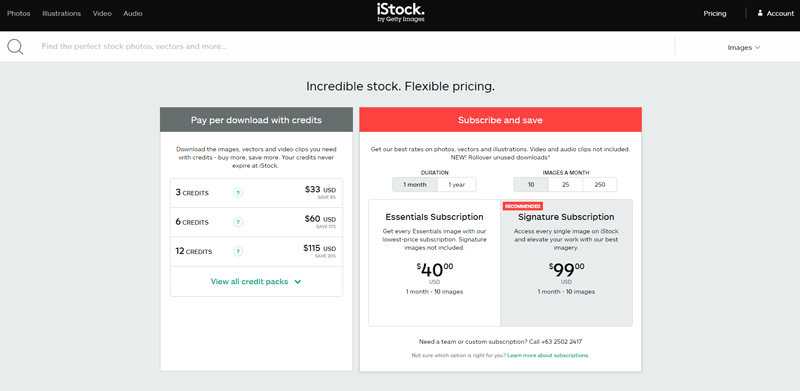
iStock delivers premium stock photos with two distinct collections: Essentials and Signature. The Essentials collection provides budget-friendly images perfect for everyday projects, while the Signature collection features exclusive, higher-quality stock photos you won’t find elsewhere. Their credit system offers flexibility—purchase credits in packs (starting at $12 per credit) and spend them as needed. For regular content needs, their subscription plans begin at $29 monthly for 10 downloads. I often turn to iStock when I need distinctive images that stand out from standard stock photo offerings.
Depositphotos
Depositphotos offers one of the most cost-effective ways to buy stock photos without sacrificing quality. Their collection includes over 230 million royalty-free images, videos, and vectors with straightforward licensing terms. Their on-demand plans start at just $9.99 for 10 images, making them ideal for small businesses with limited budgets. I find their intelligent search particularly helpful, with filters for color schemes, composition, and even negative space requirements. Depositphotos also features weekly free files and flexible subscription options that scale perfectly as my projects grow in scope and frequency.
Pricing Models for Stock Photography
Understanding pricing models is essential when you decide to buy stock photos for your projects. Stock photography websites offer various purchasing options to accommodate different budgets and usage needs. Let’s explore the common pricing structures available on most platforms.
Subscription Plans
Subscription plans are the most cost-effective way to buy stock photos if you need images regularly. These plans typically provide a monthly download allowance at a fixed price, significantly reducing the per-image cost. For example, Shutterstock offers plans starting at $29 per month for 10 images, while Adobe Stock provides subscriptions beginning at $29.99 for 10 downloads monthly. Many platforms offer tiered subscriptions—the more images you download per month, the cheaper each image becomes. Annual subscriptions often come with additional discounts compared to monthly billing, making them ideal for businesses with consistent image needs.
Pay-Per-Image Options
Pay-per-image options let you purchase stock photos without committing to a subscription. This model works through credit packs or on-demand purchases where you buy images individually. Credit packs typically offer bulk discounts—the more credits you purchase at once, the better value you get. For instance, iStock sells credit packs ranging from 1 to 300 credits, with single images costing between 1-3 credits depending on collection quality. This pricing model is perfect for occasional buyers or those with specific, limited image needs. Many platforms also offer enhanced search filters for pay-per-image customers to help find the perfect stock photos image quickly.
Extended Licenses
Extended licenses provide additional usage rights beyond what’s included in standard licenses when you buy stock photos. These specialized licenses allow for higher-value commercial applications such as merchandise production, template resale, or unlimited print runs. Pricing for extended licenses is typically higher than standard options, ranging from $80 to $500+ per image depending on the platform and specific usage rights granted. For example, Depositphotos charges approximately $80 for an extended license, while Shutterstock’s enhanced license starts at around $199. While more expensive, extended licenses offer crucial legal protection for businesses using stock photos in products they intend to sell or distribute widely, preventing potential copyright issues down the road.
How to Choose the Right Stock Photos for Your Needs
Selecting the perfect stock photos for your projects involves more than just finding visually appealing images. It requires a strategic approach to ensure the photos align with your brand, message, and intended use. Here’s how to make informed choices when you buy stock photos.
Quality Considerations
High-quality stock photos elevate your content’s professional appearance and effectiveness. When browsing stock photo websites, I recommend examining several technical aspects to ensure optimal quality:
Resolution and size: Look for images with at least 300 DPI for print projects and appropriate pixel dimensions for your specific needs
Composition: Select photos with balanced elements, proper framing, and clear focal points
Lighting: Choose images with natural, well-distributed lighting that enhances the subject
Editing quality: Avoid over-processed images with excessive filters or unnatural colors
Technical sharpness: Inspect photos at 100% zoom to check for blur, noise, or pixelation
Many premium stock photos offer multiple size options, allowing you to download the appropriate resolution for your specific application. Remember that larger file sizes provide more flexibility for cropping and resizing while maintaining image integrity.
Relevance and Authenticity
The most impactful stock photos connect authentically with your audience and support your message. When you buy stock photos, consider these factors to ensure relevance:
Target audience alignment: Select images that reflect your audience’s demographics, values, and experiences
Brand consistency: Choose photos that match your established visual identity and tone
Cultural sensitivity: Verify that images appropriately represent diverse groups without reinforcing stereotypes
Contextual accuracy: Ensure the scenes, props, and environments in the photos make sense for your message
Authenticity: Prioritize natural-looking stock photos that avoid obviously staged or artificial scenarios
I’ve found that modern stock photo libraries offer increasingly diverse and authentic imagery. Sites like Shutterstock and Adobe Stock have expanded their collections to include more genuine representations of various cultures, body types, abilities, and lifestyles. This makes it easier to find stock photos that create genuine connections with your audience while avoiding the generic, corporate feel that characterized early stock photography.
Legal Aspects of Buying Stock Photos
When you buy stock photos, understanding the legal framework that governs their use is crucial for avoiding costly infringement issues. The legal aspects of stock photography involve specific agreements between content creators, platforms, and end users that determine how images can be used commercially and creatively.
Understanding Licensing Terms
Stock photo licensing terms define exactly what you can and can’t do with the images you purchase. Each stock photo platform offers different licensing models that specify usage parameters. Standard licenses typically allow for basic usage in digital media, print publications, and marketing materials with certain impression limits. Extended licenses provide broader rights, including merchandise production, templates for resale, or unlimited print runs. When I purchase stock photos from sites like Shutterstock or Adobe Stock, I always check whether the license covers my specific usage needs, such as geographic restrictions, duration of use, and whether model releases are included for images featuring recognizable people.
Copyright and Usage Rights
Copyright protection automatically applies to stock photos from the moment they’re created, with photographers retaining ownership even after selling usage rights. When you buy stock photos, you’re purchasing a license to use the image, not ownership of the copyright itself. Usage rights vary significantly between platforms and license types. Editorial use permissions differ from commercial rights, with the former limited to informational content and prohibited from advertising or promotional contexts. Stock photos marked “editorial only” lack proper model or property releases, restricting their use to non-commercial purposes. I’ve learned that exceeding the scope of purchased rights—such as using an image beyond the allowed timeframe or in unauthorized contexts—can result in copyright infringement claims and financial penalties starting at $1,500 per violation under U.S. copyright law.
Tips for Getting the Most Value When Buying Stock Photos
Finding great stock photos at reasonable prices isn’t just about choosing the cheapest option. It’s about maximizing value while meeting your specific needs. Here are practical strategies I’ve developed to help you get more bang for your buck when purchasing stock photos.
Use Advanced Search Filters
Stock photo websites offer powerful search capabilities that many users underutilize. When looking to buy stock photos, take advantage of these filters:
Orientation filters – Narrow results to landscape, portrait, or square formats that match your layout
Color search – Find images with specific color palettes to complement your brand
Negative filters – Exclude elements you don’t want using minus operators
Similar image search – Upload reference images to find comparable options
Freshness filters – Sort by recently added content for trending and contemporary visuals
Using these advanced filtering techniques saves time and helps you discover perfect images that might otherwise remain buried in vast libraries.
Consider Image Resolution Requirements
Paying for ultra-high resolution when you don’t need it wastes money. Before buying stock photos, determine the exact resolution requirements:
Web content typically only requires 72dpi images at the specific dimensions needed
Billboard or large format projects need specialized high-resolution assets
Many stock photo sites offer variable pricing based on image size. By selecting only the resolution you actually need, you’ll often pay significantly less per download.
Leverage Subscription Timing
Timing your subscription purchase strategically maximizes value when buying cheap stock photos:
Sign up when planning multiple projects that require numerous images
Take advantage of seasonal promotions (Black Friday, end-of-quarter sales)
Consider annual plans for consistent ongoing needs, which often discount per-image costs by 40-60%
Cancel or pause subscriptions during slow periods to avoid paying for unused downloads
Most platforms allow you to download your full monthly allocation on the first day, making it possible to get all needed images quickly before canceling.
Explore Complementary Collections
Don’t limit yourself to a single stock photo provider. Different platforms excel in different visual categories:
Shutterstock often has superior business and technology imagery
Adobe Stock features exceptional creative and artistic photos
iStock provides strong lifestyle and authentic cultural content
Depositphotos offers competitive prices on common commercial concepts
I often maintain a primary subscription on one platform while making occasional purchases from others when I need specialized content. This hybrid approach ensures access to the widest range of stock photos without overpaying.
Build an Organized Image Library
Creating your own organized library of purchased stock photos prevents redundant purchases and maximizes each investment:
Develop a consistent tagging system for downloaded images
Create folders organized by theme, project, or visual style
Maintain a spreadsheet tracking licensing details and usage rights
Use image management software to catalog your growing collection
This organization system lets you quickly search your existing library before buying new stock photos, potentially saving hundreds of dollars in unnecessary purchases.
Alternatives to Paid Stock Photography
Free Stock Photo Websites
Free stock photo websites offer an excellent alternative to paid stock photos with extensive collections of high-quality images available at no cost. Platforms like Unsplash, Pexels, and Pixabay provide thousands of professional photos across numerous categories. I’ve found these sites particularly useful for blog posts and social media content where budget constraints may exist. Most free stock photos are available under Creative Commons Zero (CC0) licenses, allowing use without attribution in both personal and commercial projects. However, it’s important to verify the specific licensing terms as they vary between platforms. While free stock photos provide impressive quality, they typically offer less variety and fewer niche-specific images compared to paid stock photos sites.
Creative Commons Images
Creative Commons images represent a middle ground between free and paid stock photos. These images are shared under various Creative Commons licenses that permit reuse while protecting certain rights. Platforms like Flickr and Wikimedia Commons host millions of images with different license types ranging from CC0 (no restrictions) to licenses requiring attribution, non-commercial use only, or no derivative works. When using Creative Commons stock photos, I always check the specific license requirements to ensure compliance. For example, many CC images require attribution, which means crediting the original photographer in your project. The advantage of Creative Commons stock photos is the vast selection available, though finding high-resolution, professional-quality images can take more time than on curated stock photo sites.
Public Domain Resources
Public domain resources provide another valuable alternative to paid stock photos. Images in the public domain are free from copyright restrictions, either because their copyright has expired or they were released without copyright protection. Government agencies like NASA and the U.S. National Archives offer extensive collections of public domain images. Historical archives and museum collections also frequently digitize and release public domain works. These stock photos images often include historical photographs, classic artwork, and scientific imagery that can add unique value to projects. The main advantage of public domain stock photos is unrestricted usage rights, though the selection tends to focus more on historical and educational content rather than contemporary commercial imagery.
Creating Original Photography
Creating original photography eliminates the need to buy stock photos while providing completely unique visual content. With the improving quality of smartphone cameras, producing professional-looking images has become more accessible. I’ve found that investing in basic equipment like a tripod, some simple lighting, and a few photography tutorials can dramatically improve the quality of original photos. The primary advantages include total control over image style, exact alignment with brand aesthetics, and exclusive rights to the content. Additionally, original photography creates authentic representations of products, team members, and work environments that resonate more genuinely with audiences than stock imagery. While this approach requires more time and some initial investment, it often proves cost-effective for businesses with ongoing image needs compared to repeatedly purchasing stock photos.
Conclusion
Stock photography has transformed how we source visual content offering a balance of quality convenience and affordability. Whether you’re a blogger marketer or business owner these resources can elevate your projects without breaking the bank.
I’ve walked you through the best platforms pricing considerations and legal aspects to help you make informed decisions. Remember that exploring multiple options from paid subscription services to free alternatives can help you find the perfect images for your needs.
Ultimately investing in the right stock photos isn’t just about filling space—it’s about enhancing your message and connecting with your audience. With the knowledge from this guide you’re now equipped to navigate the stock photo landscape with confidence and creativity.
As a graphic designer I know how crucial image resolution can be for both print and digital projects. Whether you’re preparing photos for a magazine spread or uploading images to your website finding the DPI (dots per inch) of your images is an essential skill that every creative professional should master.
I’ve spent years working with various image formats and I’ll show you several quick and easy methods to check your image DPI. From using built-in operating system tools to professional software solutions you’ll learn how to verify image resolution in just a few clicks. Understanding DPI isn’t just about technical specifications – it’s about ensuring your visuals look crisp and professional across all platforms.
What Is DPI and Why It Matters
DPI or dots per inch represents the number of ink dots a printer places within a one-inch line of your image. In digital displays this measurement is often referred to as PPI (pixels per inch). I’ve found that understanding DPI is crucial for anyone working with images especially when preparing files for both print and digital use.
A 300 DPI image contains 300 dots of information in every linear inch making it the standard resolution for professional printing. I regularly work with print materials and can confirm that anything less than 300 DPI often results in fuzzy or pixelated output. Here’s a quick breakdown of common DPI requirements:
Output Type
Required DPI
Use Case
Web/Digital
72-96 DPI
Websites social media email
Office Printing
150-200 DPI
Internal documents reports
Professional Print
300+ DPI
Marketing materials magazines books
Large Format
150-300 DPI
Banners posters billboards
When I’m preparing images for different purposes I always check the DPI first. An image might look perfect on your screen at 72 DPI but print terribly at that resolution. This is why knowing how to find image DPI is essential for:
Ensuring print quality meets professional standards
Maintaining image clarity across different platforms
Preventing pixelation in final outputs
Managing file sizes effectively
Meeting client and printer specifications
The relationship between DPI and image quality isn’t just about higher numbers being better. I’ve learned that it’s about using the right resolution for each specific purpose. A higher DPI means more detail but also larger file sizes which isn’t always necessary for every project.
Methods to Find Image DPI
After years of working with digital images I’ve discovered several reliable methods to check image DPI. Here are the most effective approaches I use regularly sorted by platform and tools.
Using Windows File Properties
I find Windows offers one of the quickest ways to check image DPI. Here’s my process:
Right-click on the image file and select “Properties”
Click the “Details” tab
Look for “Horizontal Resolution” and “Vertical Resolution”
The numbers displayed represent the DPI
This method works for most image formats including JPEG PNG and TIFF files. However I’ve noticed it doesn’t always show DPI for some specialized formats.
Checking DPI in Adobe Photoshop
Photoshop provides the most detailed DPI information:
Open your image in Photoshop
Click Image > Image Size
Look at the “Resolution” field
Check “Resample” if you need to change the DPI
I particularly value Photoshop’s ability to both display and modify DPI settings while preserving image quality. The Image Size dialog also shows the physical print dimensions at the current DPI.
Finding DPI on Mac
On macOS I use these steps:
Open the image in Preview
Click Tools > Show Inspector (or press Command-I)
Select the “More Info” tab
Look for “DPI” or “Resolution”
The Mac Preview app provides a straightforward way to check resolution without needing specialized software. I find this method especially useful for quick DPI checks.
Using Online DPI Checker Tools
When I don’t have access to desktop software I rely on these web-based options:
Upload the image to services like ImageDPI.com
Drag and drop files to DPIchecker.com
Use browser-based tools like Photopea
These online tools are particularly helpful when I’m working on different computers or need to quickly verify an image’s DPI. Most provide additional information like pixel dimensions and file size.
Common DPI Standards for Different Uses
As a professional designer I know that understanding DPI standards is crucial for delivering optimal image quality across various platforms. Here’s my detailed breakdown of common DPI requirements for different applications.
Print Requirements
When it comes to print materials I always ensure my images meet specific DPI thresholds. Here’s what I recommend for different print formats:
Print Format
Required DPI
Best Use Case
Magazine/Book
300 DPI
High-quality publications
Newspaper
200 DPI
Daily print media
Business Cards
300-350 DPI
Professional marketing
Billboards
100-150 DPI
Large format viewing
Office Documents
150-200 DPI
Internal documents
Web and Digital Display
For digital platforms I typically work with lower DPI settings to optimize loading times while maintaining quality:
Digital Medium
Standard DPI
Purpose
Websites
72 DPI
Fast loading pages
Mobile Apps
96 DPI
Screen optimization
Social Media
72-96 DPI
Platform requirements
Email Graphics
72 DPI
Quick delivery
Digital Ads
96 DPI
Online marketing
Professional Photography
Photography Type
Recommended DPI
Application
Fine Art Prints
300-600 DPI
Gallery displays
Wedding Albums
300 DPI
Premium photo books
Stock Photos
300 DPI
Commercial licensing
Portfolio Images
300 DPI
Professional display
Photo Restoration
600+ DPI
Detailed editing
Troubleshooting DPI Issues
When working with image resolution I frequently encounter DPI-related challenges that can affect final output quality. Here’s how to identify and resolve common DPI problems.
Low DPI Problems
I’ve found that low DPI issues often manifest in several distinct ways:
Pixelation when images are enlarged
Blurry or fuzzy print output
Jagged edges on text and shapes
Poor detail retention in printed materials
Unprofessional appearance in marketing materials
To address these issues I recommend:
Rescan physical images at 300 DPI or higher
Source high-resolution digital images
Avoid enlarging low-resolution images
Use vector formats when possible for logos
Request original files from clients instead of web-downloaded versions
High DPI Concerns
While high DPI might seem ideal I’ve encountered several challenges when working with extremely high-resolution images:
Unnecessarily large file sizes
Slower processing times in editing software
Limited email sharing capabilities
Extended upload/download times
Increased storage requirements
Printing delays with some devices
Optimize DPI based on final output needs
Use file compression when appropriate
Create web-optimized versions for digital use
Consider storage solutions for large files
Balance quality requirements with practical limitations
Common DPI Issues
Recommended Solution
Typical File Size Impact
Web images at 300 DPI
Reduce to 72-96 DPI
75% smaller
Print files at 72 DPI
Increase to 300 DPI
4x larger
Photos at 600+ DPI
Optimize to 300 DPI
50% smaller
Tips for Working With DPI
After checking image DPI I find it essential to manage resolution effectively for different projects. Here are my proven tips for handling DPI conversions and maintaining image quality across various platforms.
Converting Between Different DPI Settings
I always start by determining the final output requirements before converting DPI settings. Here’s what I recommend:
Use the “Resample” option in image editing software to change DPI while preserving quality
Convert from higher to lower DPI when possible as upscaling often reduces quality
Apply the following conversion ratios for common transitions:
Web to Print: 72 DPI to 300 DPI (multiply dimensions by 0.24)
Print to Web: 300 DPI to 72 DPI (multiply dimensions by 4.17)
Save a copy of the original high-resolution file before converting
Maintaining Image Quality
Start with the highest resolution source files available
Use non-destructive editing techniques
Apply sharpening after DPI conversion not before
Consider these quality-preservation methods:
Smart Objects in Photoshop
Vector formats for logos and graphics
Bicubic Smoother for enlarging
Bicubic Sharper for reducing
Image Type
Original Size
Web Version (72 DPI)
Print Version (300 DPI)
Photo
3000x2000px
720x480px
10×6.7 inches
Logo
1000x1000px
240x240px
3.3×3.3 inches
Best Practices for Image Resolution
Start with High-Resolution Sources
I always recommend capturing or acquiring images at the highest possible resolution. When I work with source files I ensure they’re at least 300 DPI for maximum flexibility. This allows me to scale down as needed while maintaining quality. Starting with low-resolution images limits your options and can lead to poor output quality.
Maintain Original Files
I keep original high-resolution files in a separate folder from working copies. This practice has saved me countless times when I need to repurpose images for different uses. I store these files in uncompressed formats like TIFF or PSD to preserve quality.
Use Appropriate Resolution for Each Medium
Based on my experience working across platforms I follow these resolution standards:
Medium
Recommended DPI
Typical File Size
Web Images
72-96 DPI
100KB – 500KB
Office Printing
150-200 DPI
1MB – 3MB
Professional Print
300-350 DPI
5MB – 15MB
Large Format
150-300 DPI
20MB – 100MB
Scale Images Properly
When I need to resize images I always:
Scale down rather than up
Use proper interpolation methods
Maintain aspect ratios
Apply sharpening after resizing
Check DPI settings before final output
Optimize File Formats
I choose file formats based on the intended use:
JPEG for photographs and web content
PNG for graphics with transparency
TIFF for professional printing
PDF for document integration
Regular Quality Checks
Before finalizing any project I verify image resolution by:
Checking image properties
Viewing at 100% zoom
Testing prints at actual size
Using software tools to confirm DPI settings
These practices help me maintain consistent image quality across all my design projects while ensuring optimal file sizes for each medium.
Tools and Software for DPI Management
Professional Design Software
I rely heavily on Adobe Creative Suite for precise DPI management. Adobe Photoshop offers the most comprehensive tools through its Image Size dialog box (Image > Image Size). Similarly Adobe Illustrator and InDesign provide built-in resolution checking features that I use daily for professional projects.
Operating System Tools
For quick DPI checks I frequently use:
Windows: File Explorer > Right-click > Properties > Details
Mac: Preview app > Tools > Show Inspector
Linux: Image Viewer > Properties
Online DPI Checkers
When I need to verify DPI without installing software I turn to these reliable web-based tools:
Website
Key Features
Free/Paid
ImageDPI.com
Bulk checking multiple files
Free
DPIchecker.com
Detailed resolution reports
Free
PhotoDPI.com
Resolution converter
Free with premium options
Mobile Apps
For on-the-go DPI checking I recommend:
Photo Investigator (iOS)
Photo EXIF Editor (Android)
Image Info (Cross-platform)
Browser Extensions
These browser add-ons help me quickly check image DPI while browsing:
Image Size Info (Chrome)
DPI Detector (Firefox)
Resolution Finder (Edge)
These tools range from basic DPI checkers to comprehensive image management solutions. I find having multiple options helps me work efficiently across different platforms and project requirements.
Final Verdict
Finding image DPI doesn’t have to be complicated. With the tools and methods I’ve shared you’ll be well-equipped to check resolution quickly and ensure your images meet quality standards for any project.
Whether you’re using built-in system tools professional software or online checkers there’s always a convenient way to verify DPI. I recommend bookmarking your preferred method and making DPI checks a regular part of your workflow.
Remember that choosing the right DPI for your specific needs is crucial for achieving optimal results. Now that you know how to check image resolution you can confidently deliver high-quality visuals that look great across all platforms.
For centuries, Paris has reigned as the undisputed art capital of the Western world, where pioneering artists like Van Gogh, Picasso, Monet, and Dalí created their masterpieces. Today, the City of Light continues to be a magnetic hub for contemporary art in all its forms, from paintings and sculptures to cutting-edge photography and virtual reality installations.
We’ve explored the vibrant art scene across Paris’s diverse neighborhoods, from the hip Le Marais quarter to the edgy Belleville district and the chic Saint-Germain area. While the city’s mammoth classical institutions deserve their reputation, it’s the thriving contemporary art galleries that truly showcase Paris’s evolving artistic spirit. These spaces regularly present major exhibitions featuring works by both French and international artists, maintaining the city’s position at the forefront of global art innovation.
Paris Art Gallery Districts: A Neighborhood Guide
Art galleries in Paris France cluster in distinct neighborhoods, each with its own artistic character. These cultural hubs showcase contemporary works alongside historical pieces in both established venues and emerging spaces.
The Historic Marais District
The Marais spans the 3rd and 4th arrondissements, stretching from the Seine to Place de la République. This district attracts younger galleries that showcase early-career artists, offering a more experimental approach than traditional venues. Contemporary art spaces occupy former leather workshops, with notable concentrations near Centre Pompidou and along Rue de Turenne. Rising rents push newer galleries toward the northern edges, creating an evolving artistic landscape.
Saint-Germain-des-Prés Art Scene
Saint-Germain-des-Prés divides into two distinct gallery zones. The first area specializes in primitive art and antiques, while the second section near Rue de Seine focuses on modern and contemporary works. Notable spaces include Galerie Georges-Philippe & Nathalie Vallois, known for discovering emerging talents since the 1990s. The Kamel Mennour gallery, featuring artists like Anish Kapoor and Martin Parr, maintains three locations in this district.
Montmartre’s Artist Quarter
Montmartre preserves its legacy as Paris’s original artist enclave through intimate galleries and exhibition spaces. Contemporary art venues occupy historic buildings along the cobblestone streets, displaying works by emerging French artists. Small independent galleries cluster around Place du Tertre and Rue des Abbesses, offering rotating exhibitions of paintings, sculptures and photography by local artists.
District
Gallery Focus
Notable Features
Marais
Contemporary, Emerging Artists
Near Centre Pompidou
Saint-Germain
Modern Art, Antiques
Dual Gallery Zones
Montmartre
Local Artists, Traditional
Historic Architecture
Major Contemporary Art Galleries
Art galleries in Paris France showcase an extensive collection of contemporary works across various prestigious venues. These galleries represent both established international artists and emerging talents in the contemporary art scene.
Leading Commercial Galleries
Perrotin Gallery occupies a magnificent hôtel particulier in Rue Turenne, presenting works by renowned artists like Takashi Murakami. Galerie Lelong & Co, established in 1981, champions contemporary artists through major public commissions. The Galerie Chantal Crousel features international artists including Wade Guyton, Mona Hatoum, Wolfgang Tillmans and Haegue Yang. Galerie Karsten Greve exhibits legendary artists such as Jean Dubuffet, Willem de Kooning, Louise Bourgeois and Pierre Soulages.
Emerging Artist Spaces
The Rue Béranger area, located near Place de la République, hosts innovative contemporary galleries in transformed merchant spaces. Notable venues include 193 Gallery, Bim Bam, cadet capela and DS Galerie, which opened since 2020. The Martine Aboucaya gallery, Christian Berst gallery and Campoli Crespi gallery showcase experimental works from rising artists. The Papillon gallery and Mor Charpentier gallery contribute to the district’s dynamic emerging art scene.
Photography-Focused Galleries
Polka Galerie stands as a premier destination for photography exhibitions in Paris. The gallery presents both historical and contemporary photography collections through rotating exhibitions. Several contemporary art spaces incorporate photography alongside other mediums, creating dynamic visual narratives through lens-based works. These specialized venues offer intimate viewing experiences of photographic works by both established and emerging photographers.
Gallery District
Notable Spaces
Specialization
Marais
Perrotin, Chantal Crousel
Contemporary Art
Rue Béranger
193 Gallery, Bim Bam
Emerging Artists
Saint-Germain
Georges-Philippe & Nathalie Vallois
Modern & Contemporary
Various Locations
Polka Galerie
Photography
Historic Museum Galleries
Paris’s historic museum galleries house some of the world’s most significant art collections, offering visitors access to masterpieces spanning multiple centuries. These institutions stand as cornerstones among the art galleries in Paris, France, drawing millions of visitors annually.
The Louvre Galleries
The Louvre reigns as the world’s most-visited museum, welcoming 8.9 million visitors in 2023. This former royal palace displays 35,000 artworks and artifacts from prehistory to the 21st century. The museum’s vast collection includes iconic pieces like the Mona Lisa, housed in halls where Louis XIV once walked before relocating to Versailles.
Musée d’Orsay Collections
The Musée d’Orsay occupies a striking position along the Seine River, featuring a vast collection of Impressionist masterpieces. The museum’s transformation from a railway station into a premier art institution exemplifies Paris’s commitment to preserving cultural spaces while creating dynamic environments for artistic display.
Centre Pompidou Exhibitions
The Centre Pompidou revolutionized museum architecture in 1977 with its distinctive inside-out design featuring exposed colored pipes and external elevators. Housing Europe’s largest modern art collection, the museum presents major international exhibitions featuring artists like Monet, Turner, Chagall and Gauguin. The center offers free admission to its permanent collection on the first Sunday of each month, showcasing works across fine arts, photography and graphic design.
Museum
Annual Visitors
Collection Size
Notable Features
Louvre
8.9 million
35,000 pieces
World’s largest art museum
Centre Pompidou
Not specified
Largest in Europe
Free entry first Sunday monthly
Bourse de Commerce
Not specified
5,000 pieces
Contemporary art focus
Navigating Paris Gallery Culture
Art galleries in Paris France follow distinct operational patterns throughout the year. The gallery scene pulses with energy during key events like Paris Gallery Weekend in spring and FIAC in autumn.
Best Times to Visit
Peak viewing hours at Paris galleries run from 11 AM to 7 PM Tuesday through Saturday. October brings FIAC (International Contemporary Art Fair) with extended hours at major galleries. Spring offers Paris Gallery Weekend with special exhibitions across 40+ venues. Weekday afternoons provide quieter viewing experiences with fewer crowds. Major galleries often coordinate exhibition openings on Thursday evenings, creating vibrant art walks across neighborhoods.
Gallery Etiquette Tips
Photography policies vary by gallery – ask permission before taking pictures. Private galleries expect visitors to sign guest books upon entry. Leave large bags at coat check facilities when provided. Maintain conversational distance (approximately 2 feet) from artworks. Enter group discussions only after exhibitions open for 15 minutes. Galleries welcome questions about artists but discourage touching artwork or leaning on walls. Remove sunglasses inside gallery spaces. Respect “vernissage” (private opening) events by attending only with invitation.
Gallery Protocol
Details
Opening Hours
Tue-Sat: 11 AM – 7 PM
Peak Season
Oct (FIAC), May (Gallery Weekend)
Quiet Hours
Tue-Thu: 2 PM – 5 PM
Photography
Permission required
Group Size
Max 6 without appointment
Supporting the Arts Scene
Paris’s contemporary art galleries actively nurture emerging talents through innovative exhibitions programs across France. Our vibrant arts ecosystem connects artists with collectors through regular events throughout the year.
Gallery Events and Openings
Art galleries in Paris France maintain dynamic exhibition schedules featuring vernissages (opening receptions) for new shows every 6-8 weeks. Contemporary galleries showcase 10-20 artists in rotating exhibitions spanning 6 months each. Gallery events create networking opportunities between creators collectors curators.
Art Fairs and Festivals
Paris hosts several prestigious international art fairs that attract global participants:
Event Name
Details
Time of Year
FIAC
International Contemporary Art Fair – Leading global art event
October
Paris+ par Art Basel
Premier contemporary art showcase
Fall
Paris Gallery Weekend
City-wide gallery celebration
Spring
The fairs transform the city into an international art marketplace where galleries present curated selections of contemporary works. These events provide critical platforms for artists to gain exposure enhance their professional networks and connect with serious collectors.
Conclusion
Paris’s art gallery scene offers an unparalleled blend of history tradition and contemporary innovation. We’ve explored how this magnificent city continues to shape the global art landscape through its diverse gallery districts unique exhibitions and cultural events.
Whether you’re an experienced collector or simply an art enthusiast there’s something extraordinary waiting in every corner of Paris. From the historic halls of the Louvre to the cutting-edge spaces in Le Marais the city’s galleries invite us to experience art in its most captivating forms.
The magic of Paris’s art world lies in its ability to honor the past while embracing the future making it an enduring destination for art lovers worldwide.
In the world of graphic design, free vectors have become an invaluable resource for creatives seeking high-quality, scalable images without breaking the bank. These versatile digital assets offer endless possibilities for both personal and commercial projects, allowing designers to enhance their work with professional-grade graphics.
We’ll explore the benefits of using free vectors and how they can elevate your design game. From understanding the difference between raster and vector graphics to discovering the best sources for downloading these assets, we’ll cover everything you need to know to make the most of this powerful design tool. Whether you’re a seasoned professional or just starting out, free vectors can be a game-changer in your creative process.
Key Takeaways
Free vectors are scalable, editable digital graphics available at no cost for various design projects
Popular types include illustrations, icons, logos, backgrounds, UI elements, and infographic components
Top websites for finding free vectors include Freepik, Vecteezy, and Flaticon
Benefits of using free vectors include cost-effectiveness and time-saving, but drawbacks may include limited customization and potential overuse
Properly crediting artists and modifying vectors using appropriate software can help create unique designs while respecting creators’ rights
What Are Free Vectors?
Free vectors are digital graphic elements available at no cost, offering scalable and editable designs for various creative projects. These versatile resources come in different formats and serve multiple purposes across industries.
Types of Free Vectors
Free vectors come in several types, catering to diverse design needs:
Illustrations: Hand-drawn or digital artwork for visual storytelling
Icons: Simplified symbols representing concepts or actions
Logos: Brand identifiers for companies or organizations
Backgrounds: Decorative patterns or scenes for layering designs
UI Elements: Components for website and app interfaces
Infographic Elements: Visual aids for data representation
Each type serves specific functions in graphic design, providing flexibility and creativity to designers working with limited budgets.
Common Uses for Free Vectors
Free vectors find applications in numerous fields:
Marketing Materials: Brochures, flyers, and social media graphics
Web Design: Website headers, buttons, and banners
Packaging Design: Product labels and box artwork
Presentations: Slide backgrounds and data visualizations
T-shirt Designs: Custom apparel graphics
App Development: User interface elements and icons
These versatile assets enhance visual communication across various platforms, making them invaluable for both personal and commercial projects. While platforms like Shutterstock offer premium vector options, many designers turn to free vector resources to complement their work or explore new ideas without financial constraints.
Top Websites to Find Free Vectors
We’ve compiled a list of the best websites to discover high-quality free vectors for your design projects. These platforms offer a wide range of vector graphics that can enhance your creative work without breaking the bank.
Freepik
Freepik is a leading resource for free vectors, offering an extensive library of high-quality graphics. It’s user-friendly interface allows easy searching and filtering of vector files by color, style, and category. Freepik provides both free and premium options, with many vectors available for download at no cost. The platform also offers exclusive content for premium subscribers, making it a versatile choice for designers at all levels.
Vecteezy
Vecteezy stands out as a popular destination for free vector art, icons, and illustrations. It boasts a vast collection of vector graphics suitable for various design needs. The website features an intuitive search function and well-organized categories, simplifying the process of finding the perfect vector for your project. Vecteezy offers both free and pro licenses, with clear attribution requirements for free downloads. Their pro subscription provides access to premium content and removes attribution requirements.
Flaticon
Flaticon specializes in vector icons, offering an impressive collection of over 5 million free icons in various styles and formats. It’s an invaluable resource for designers seeking consistent icon sets for their projects. The platform allows users to customize icons by changing colors and sizes before downloading. Flaticon offers a free plan with daily download limits and a premium subscription for unlimited access. Its integration with other design tools makes it a convenient choice for professionals and beginners alike.
Benefits of Using Free Vectors
Free vectors offer numerous advantages for designers and creative professionals. They provide cost-effective and efficient solutions for various design projects. Let’s explore the key benefits of incorporating free vectors into your design workflow.
Cost-Effective Design Solutions
Free vectors significantly reduce project expenses, making them an attractive option for designers on tight budgets. Unlike premium stock images from platforms like Shutterstock or iStock, free vectors don’t require upfront costs or subscription fees. This cost-saving aspect allows designers to allocate resources to other crucial elements of their projects. Additionally, the availability of free vectors enables small businesses and startups to create professional-looking designs without breaking the bank.
Time-Saving Resources
Using free vectors streamlines the design process, saving valuable time for designers. Instead of creating every element from scratch, designers can leverage pre-made vector graphics as a starting point or incorporate them directly into their projects. This efficiency allows for faster project turnaround times and increased productivity. Free vector libraries often include a wide range of ready-to-use elements, such as icons, illustrations, and backgrounds, which can be quickly customized to fit specific design needs.
Potential Drawbacks of Free Vectors
While free vectors offer numerous benefits, they also come with certain limitations. We’ll explore two main drawbacks that designers should consider when using these resources.
Limited Customization Options
Free vectors often come with restrictions on editing and customization. Many free resources provide basic designs that can’t be extensively modified, limiting creative freedom. This constraint can be particularly challenging when trying to align the vector with a specific brand identity or project requirements. In contrast, premium vector services like Shutterstock offer more flexibility and advanced editing capabilities, allowing designers to tailor vectors to their exact needs.
Overuse and Lack of Uniqueness
The widespread availability of free vectors can lead to overuse, resulting in designs that lack originality. Popular free vector designs are frequently used across various projects, potentially making your work appear generic or unoriginal. This issue is especially prevalent in competitive industries where standing out is crucial. To avoid this, designers often turn to paid services or create custom vectors. While platforms like Shutterstock offer a wider range of unique vectors, they come at a cost. However, using iStock coupons or taking advantage of iStock prices during promotions can help mitigate expenses while still accessing more distinctive vector options.
How to Properly Credit Free Vector Artists
When using free vectors in our design projects, it’s crucial to give proper credit to the artists who created them. This practice not only shows respect for their work but also ensures we’re using the resources ethically and legally. Here’s how we can properly credit free vector artists:
Check the licensing terms:
Review the specific licensing requirements for each free vector
Look for any attribution clauses or restrictions on use
Include artist information:
Mention the artist’s name or username
Provide a link to their profile or portfolio
Specify the source:
Name the website where we found the free vector (e.g., Freepik, Vecteezy)
Include a direct link to the vector’s download page
Add credit in the appropriate location:
For print designs: Include credits in a separate section or footnote
For digital projects: Add credits in the footer or a dedicated credits page
Use the correct format:
Follow any specific attribution format required by the artist or platform
Example: “Vector designed by [Artist Name] / [Website Name]”
By following these guidelines, we ensure that we’re using free vectors responsibly while supporting the artists who contribute to platforms like Freepik and Vecteezy. This practice also helps maintain the availability of high-quality free resources for the design community.
Tips for Modifying Free Vectors
When working with free vectors, it’s essential to know how to modify them effectively to suit your specific design needs. Here are some practical tips to help you make the most of these resources:
Use Vector Editing Software
To modify free vectors, use vector editing software such as Adobe Illustrator, CorelDRAW, or Inkscape. These programs allow you to manipulate individual elements of the vector without losing quality.
Ungroup and Break Apart
Many free vectors come as grouped elements. Ungroup them to access individual components. This allows you to modify specific parts of the design without affecting others.
Adjust Colors and Gradients
Customize the color scheme to match your project’s requirements. Change fill colors, stroke colors, and gradients to create a unique look that aligns with your brand or design concept.
Scale and Resize
Take advantage of vectors’ scalability by resizing elements without losing quality. Adjust proportions to fit your layout while maintaining crisp edges and smooth lines.
Combine Multiple Vectors
Mix and match elements from different free vectors to create original compositions. This technique helps avoid overused designs and adds a personal touch to your work.
Add or Remove Elements
Enhance free vectors by adding your own elements or removing unnecessary ones. This customization helps create a design that’s tailored to your specific needs.
Apply Effects and Filters
Experiment with effects like drop shadows, glows, or textures to add depth and interest to your modified vectors. Use filters to create unique visual styles that complement your design.
Customize Typography
If the free vector includes text, replace it with your own typography. Choose fonts that align with your brand identity or project theme for a cohesive look.
Maintain Proportions
When resizing or modifying vector elements, use the shift key to maintain proper proportions. This ensures that your design remains balanced and visually appealing.
Save in Multiple Formats
After modifying your free vector, save it in various formats (e.g., AI, EPS, SVG) for different uses. This ensures compatibility across different platforms and applications.
By applying these tips, you’ll be able to transform free vectors into unique, personalized designs that stand out from the crowd. Remember, while free vectors from platforms like Freepik offer a great starting point, combining them with premium resources from services like Shutterstock can further enhance your design possibilities.
Conclusion
Free vectors offer immense value to designers of all levels. They provide cost-effective high-quality graphics that can enhance various projects. While they come with some limitations we’ve discussed these can be overcome with creativity and careful selection. We encourage designers to explore the world of free vectors responsibly using the resources and tips we’ve shared. By doing so you’ll expand your design toolkit save time and money and create stunning visuals that captivate your audience. Remember to always credit artists and consider mixing free vectors with premium resources for truly unique designs.
We all know the power of visual content in today’s digital world. Whether you’re a designer, marketer, or content creator, high-quality images can make or break your project. That’s where iStock comes in, offering a vast library of stunning visuals. But let’s face it, professional stock photos can be pricey.
This is where iStock coupons become your secret weapon. These money-saving codes can help you access premium content without breaking the bank. We’ll explore how to find and use these coupons effectively, ensuring you get the most value for your creative endeavors.
Key Takeaways
iStock offers a vast library of high-quality stock images, videos, and illustrations for creative professionals and businesses
iStock coupons provide significant savings on premium visual content through various discount types and promotional offers
Users can find iStock coupons through the official website, email newsletters, social media, and reputable coupon aggregator sites
Optimal times to use iStock coupons include seasonal sales, end-of-month promotions, and new user offers
Maximizing savings involves combining coupons with subscriptions, using credits wisely, and comparing prices with competitors like Shutterstock
What Is iStock?
iStock is a leading online platform for high-quality, royalty-free stock images, videos, and illustrations. As a subsidiary of Getty Images, iStock offers a vast library of visual content for creative professionals, marketers, and businesses. With millions of assets available, iStock caters to diverse project needs across various industries.
iStock’s collection includes:
Professional photographs
Vector illustrations
Video footage
Audio clips
We’ve found that iStock’s user-friendly interface makes it easy to search, filter, and download the perfect visuals for any project. The platform offers both subscription plans and credit-based purchasing options, allowing users to choose the most cost-effective method for their needs.
While iStock prices can be higher than some competitors, the platform’s reputation for quality and extensive selection often justifies the cost. However, savvy users can take advantage of iStock coupons to reduce expenses and maximize their budget for premium content.
Understanding iStock Coupons
iStock coupons are promotional offers that provide discounts on the platform’s vast collection of high-quality visual content. These coupons help users save money while accessing premium images, videos, and illustrations for their creative projects.
Types of iStock Coupons
iStock offers various coupon types to cater to different user needs:
Percentage-off coupons: Provide a fixed percentage discount on purchases
Dollar-off coupons: Offer a specific dollar amount reduction on total order
Free credit coupons: Grant users additional credits to use on the platform
Subscription discounts: Reduce the cost of monthly or annual subscriptions
Bundle deals: Combine multiple products or services at a discounted rate
Each coupon type targets specific user preferences, allowing for flexibility in savings across different purchase options.
How to Find iStock Coupons
Locating iStock coupons requires a strategic approach:
Official iStock website: Check the promotions page for current offers
Email newsletters: Subscribe to iStock’s mailing list for exclusive discounts
Social media platforms: Follow iStock’s official accounts for limited-time deals
Coupon websites: Browse reputable coupon aggregators for verified promo codes
Seasonal sales: Look for special discounts during holidays or industry events
Comparison sites: Compare iStock prices with competitors like Shutterstock
By exploring these channels, users can find valuable coupons to reduce their iStock expenses and maximize their budget for high-quality visual content.
Benefits of Using iStock Coupons
iStock coupons offer significant advantages for users seeking high-quality visual content. These promotional offers provide cost-effective solutions for accessing premium assets while maintaining budget-friendly practices.
Saving Money on Purchases
iStock coupons enable substantial savings on visual content purchases. Users can reduce their expenses by applying percentage-off or dollar-off discounts to their orders. For instance, a 20% off coupon on a $100 purchase results in a $20 saving. These discounts often apply to both single-image purchases and subscription plans, allowing users to maximize their savings across various buying options.
Accessing Premium Content
iStock coupons grant users access to premium content at reduced prices. High-quality images, videos, and illustrations, including free vector graphics, become more affordable with coupon discounts. This access to premium assets enables users to enhance their projects with professional-grade visuals without exceeding their budget constraints. Additionally, some coupons offer free credits, allowing users to explore iStock’s vast library and download select premium content at no cost.
How to Redeem iStock Coupons
Redeeming iStock coupons is a straightforward process that can help you save money on high-quality visual content. We’ll guide you through the step-by-step redemption process and address common issues you might encounter.
Step-by-Step Redemption Process
Log in to your iStock account
Select your desired content
Proceed to checkout
Enter the coupon code in the designated field
Click “Apply” to see the discount reflected
Complete your purchase with the reduced price
Expired coupons: Always check the expiration date
Incompatible content: Some coupons only apply to specific content types
Minimum purchase requirements: Ensure your order meets the stated threshold
One-time use codes: Remember that most iStock coupons can only be used once
Case sensitivity: Enter the code exactly as provided, including uppercase letters
Best Times to Use iStock Coupons
Timing is crucial when it comes to maximizing savings with iStock coupons. We’ve identified several optimal periods for using these discounts to get the most value from your purchases:
Seasonal Sales
iStock often offers significant discounts during major holiday seasons:
Black Friday and Cyber Monday (November)
Christmas and New Year (December-January)
Valentine’s Day (February)
Spring Sale (March-April)
Summer Sale (June-July)
During these periods, iStock coupons can provide even greater savings on top of already reduced prices.
End of Month
iStock frequently releases new coupons at the end of each month. This timing coincides with many businesses’ budget cycles, making it an ideal time to stock up on visual content for upcoming projects.
New User Promotions
When you’re new to iStock, keep an eye out for special introductory offers. These coupons often provide substantial discounts or free credits, allowing you to explore iStock’s vast library of images, videos, and free vectors at reduced prices.
Content Type Launches
iStock occasionally introduces new content categories or expands existing ones. During these launches, they may offer specialized coupons to promote the new content. This is an excellent opportunity to access fresh, high-quality assets at discounted rates.
Competitor Promotions
When competitors like Shutterstock run major promotions, iStock may counter with its own offers. By staying informed about industry-wide sales, you can take advantage of iStock coupons during these competitive periods.
Annual Subscription Renewals
If you’re considering renewing an annual subscription, look for coupons around your renewal date. iStock often provides loyalty discounts or special offers to encourage long-term subscribers.
By strategically timing your purchases with these optimal periods, you’ll maximize your savings and get the most value from iStock coupons.
Maximizing Your Savings with iStock Coupons
To get the most value from iStock coupons, we’ve compiled a list of strategies to help you maximize your savings:
Combine coupons with subscription plans:
Purchase annual subscriptions during promotional periods
Apply percentage-off coupons to reduce the overall cost
Look for bundle deals that offer additional savings on long-term commitments
Use credits wisely:
Redeem free credit coupons for high-value assets
Save expensive images or videos for when you have discount codes
Utilize credits before they expire to avoid waste
Compare iStock prices with competitors:
Check pricing on platforms like Shutterstock
Use iStock coupons to match or beat competitor prices
Consider the quality and uniqueness of iStock’s offerings when comparing
Take advantage of content-specific promotions:
Look for coupons targeting specific content types, such as free vector downloads
Utilize these promotions to build a diverse asset library
Plan projects around available discounts on particular content categories
Stack savings opportunities:
Combine seasonal sales with coupon codes for maximum discounts
Use referral programs in conjunction with promotional offers
Look for cashback opportunities through affiliate programs
Plan bulk purchases:
Wait for high-value coupons before making large orders
Meet minimum purchase requirements to unlock bigger discounts
Buy credit packs during promotional periods for long-term savings
Stay informed about upcoming deals:
Subscribe to iStock’s newsletter for exclusive offers
Follow their social media accounts for flash sales and limited-time promotions
Set calendar reminders for major shopping events like Black Friday
By implementing these strategies, we can significantly reduce our iStock expenses while maintaining access to high-quality visual content. Remember to always read the terms and conditions of each coupon to ensure you’re maximizing its potential and avoiding any restrictions that might limit your savings.
Alternatives to iStock Coupons
While iStock coupons offer excellent savings opportunities, exploring alternative options can help maximize your budget for visual content. Here are some alternatives to consider:
Competitor Platforms
Shutterstock: A major competitor to iStock, Shutterstock offers a vast library of high-quality images, videos, and vectors. They frequently run promotional deals and offer competitive pricing structures.
Adobe Stock: Integrated with Adobe Creative Cloud, this platform provides a seamless workflow for designers and offers a wide range of visual assets.
Depositphotos: Known for its affordable pricing, Depositphotos offers a large selection of royalty-free images, videos, and vectors.
Free Stock Photo Websites
Unsplash: Offers a curated collection of high-resolution, professionally shot photos for free use.
Pexels: Provides a wide variety of free stock photos and videos that can be used for commercial purposes.
Pixabay: Offers a large collection of free images, videos, and vectors, including many options for free vector graphics.
Subscription-Based Services
Envato Elements: Offers unlimited downloads of photos, templates, fonts, and more for a flat monthly fee.
Storyblocks: Provides unlimited downloads of stock video, audio, and images with an annual subscription.
DIY and Custom Content
In-house creation: Invest in equipment and software to produce your own high-quality visual content.
Hire freelancers: Work with photographers, illustrators, or videographers to create custom content tailored to your specific needs.
Comparison Shopping
We recommend comparing iStock prices with those of its competitors. Many platforms offer similar content, and prices can vary significantly. By exploring these alternatives, you’ll have a broader range of options to find the best value for your visual content needs.
Conclusion
We’ve explored the world of iStock coupons and their potential to transform your visual content strategy. By leveraging these discounts, you’ll unlock access to premium assets while keeping your budget in check. Remember to stay vigilant for deals, use coupons strategically, and explore alternative options when necessary. With these tools at your disposal, you’re well-equipped to elevate your projects with high-quality visuals without breaking the bank. Happy creating!
In the dynamic world of digital media, Shutterstock stands out as a powerhouse of visual content. We’ve witnessed its growth from a modest startup to a global marketplace for high-quality images, videos, and music.
As businesses and creators increasingly rely on compelling visuals to tell their stories, Shutterstock has become an indispensable resource. We’ll explore how this platform has revolutionized the way we access and use stock media, making it easier than ever for professionals and hobbyists alike to find the perfect assets for their projects.
Key Takeaways
Shutterstock is a leading global marketplace for high-quality digital content, offering over 400 million images, videos, and music tracks
The platform provides diverse licensing options, including Standard, Enhanced, and Editorial Use licenses, catering to various content usage needs
Shutterstock offers flexible pricing plans, including pay-as-you-go options and cost-effective monthly and annual subscriptions
The service is widely used across industries such as marketing, web design, and publishing for creating compelling visual content
While Shutterstock offers numerous benefits, users should consider factors like cost, licensing complexity, and potential image overuse when choosing the platform
What Is Shutterstock?
Shutterstock is a leading global marketplace for high-quality digital content, including images, videos, and music. It serves as a platform connecting creators and consumers of visual media, catering to diverse industries and creative needs.
A Brief History of Shutterstock
Founded in 2003 by Jon Oringer, Shutterstock began as a personal project with 30,000 of Oringer’s own stock photos. The company quickly expanded, attracting contributors worldwide and growing its library exponentially. By 2006, Shutterstock had licensed 1 million images. In 2012, the company went public on the New York Stock Exchange, solidifying its position as a major player in the stock media industry. Today, Shutterstock boasts a vast collection of over 400 million images, videos, and music tracks, serving customers in more than 150 countries.
Shutterstock’s Business Model
Shutterstock operates on a dual-sided marketplace model, connecting content creators with buyers. Contributors upload their work to the platform, while customers purchase licenses to use these assets. The company offers various subscription plans and on-demand purchasing options, catering to different user needs. Shutterstock’s revenue comes from licensing fees, with a portion shared with contributors based on downloads. This model has proven successful, allowing Shutterstock to compete effectively with other stock media providers like iStock. Unlike some competitors, Shutterstock doesn’t offer free vectors, focusing instead on providing a vast selection of high-quality, premium content to meet professional and commercial needs.
Key Features of Shutterstock
Shutterstock offers a comprehensive suite of features designed to meet the diverse needs of content creators and businesses. Here’s an overview of the key features that make Shutterstock a leading platform in the stock media industry:
Extensive Image Library
Shutterstock’s vast image library is its cornerstone feature, boasting over 400 million high-quality images. This diverse collection covers a wide range of subjects, styles, and themes, catering to virtually every visual need. Users can easily search, filter, and download images using advanced search tools and AI-powered recommendations. The library is constantly updated with fresh content, ensuring that subscribers always have access to the latest visual trends.
Video and Music Content
Beyond still images, Shutterstock provides an extensive collection of video footage and music tracks. The video library includes HD and 4K clips covering various topics, from nature scenes to business settings. Shutterstock’s music library offers royalty-free tracks and sound effects, perfect for enhancing video productions or creating engaging multimedia content. This diverse audio-visual offering makes Shutterstock a one-stop shop for content creators working on multi-media projects.
Vector Graphics and Illustrations
Shutterstock’s vector graphics and illustrations section is a treasure trove for designers and marketers. This feature includes a vast array of scalable vector images, icons, and illustrations that can be easily customized to fit specific project requirements. The platform offers both premium and free vector options, catering to different budget needs. Users can find everything from simple icons to complex illustrations, making it an invaluable resource for creating logos, infographics, and other design elements.
Licensing Options on Shutterstock
Shutterstock offers diverse licensing options to cater to various content usage needs. These options ensure users can access and utilize Shutterstock’s vast library of digital assets while adhering to legal and copyright requirements.
Standard License
The Standard License is Shutterstock’s most common option for everyday content use. It allows users to incorporate images, videos, or music into projects with specific limitations:
Use in digital or print media
Unlimited web views and impressions
Up to 500,000 physical prints
No resale or redistribution of the original file
Ideal for websites, social media, and small-scale marketing materials
This license is suitable for most businesses, bloggers, and individuals seeking high-quality content for their projects without the need for extensive usage rights.
Enhanced License
The Enhanced License expands usage rights for more comprehensive projects:
Unlimited physical prints
Use in merchandise for resale
Unlimited digital reproductions
Higher indemnification coverage
Allows for use in templates or items for resale
This option is perfect for large-scale marketing campaigns, merchandise production, and projects requiring broader distribution rights. The Enhanced License provides greater flexibility for commercial use and offers additional legal protection.
Editorial Use License
The Editorial Use License is specifically designed for news-related and non-commercial content:
Restricted to non-commercial, informational purposes
Suitable for newspapers, magazines, and news websites
Cannot be used for advertising or promotional materials
Requires no model or property releases
Ideal for illustrating current events, social issues, or historical topics
This license allows journalists, bloggers, and educators to use Shutterstock’s editorial content to enhance their reporting and educational materials while respecting the original context of the images or footage.
Pricing and Subscription Plans
Shutterstock offers a range of flexible pricing options to accommodate diverse user needs and budgets. We’ll explore the various plans available, including pay-as-you-go and subscription-based options, to help you find the best fit for your content requirements.
Pay-as-You-Go Options
Shutterstock’s pay-as-you-go options provide flexibility for users with occasional or unpredictable content needs. These plans allow customers to purchase image packs or on-demand downloads without committing to a subscription. Image packs typically come in sizes of 5, 10, or 25 images and offer savings compared to individual purchases. On-demand options let users buy credits that can be redeemed for various content types, including images, videos, and music tracks. This approach is ideal for those who need high-quality assets infrequently or for specific projects.
Monthly and Annual Subscriptions
For users with regular content needs, Shutterstock offers cost-effective monthly and annual subscription plans. These plans provide a set number of downloads per month, ranging from 10 to 750 images, depending on the chosen tier. Annual subscriptions often come with significant discounts compared to monthly rates, making them attractive for long-term users. Subscription plans also include access to Shutterstock’s extensive library of high-quality images, vectors, and illustrations. Some higher-tier plans even incorporate video footage and music tracks, offering a comprehensive solution for multimedia projects. By opting for a subscription, users can enjoy unlimited access to Shutterstock’s vast collection while benefiting from predictable pricing and budget management.
Using Shutterstock for Different Industries
Shutterstock’s vast library of high-quality digital assets serves a wide range of industries, providing essential visual content for various professional needs. We’ll explore how different sectors leverage Shutterstock’s resources to enhance their work and engage their audiences.
Shutterstock for Marketing and Advertising
Marketing and advertising professionals rely heavily on Shutterstock to create compelling campaigns. We’ve found that the platform’s diverse collection of images, videos, and vectors allows marketers to find the perfect visuals that resonate with their target audience. Shutterstock’s advanced search features help advertisers quickly locate assets that align with their brand identity and campaign objectives. The platform’s royalty-free licensing options also provide flexibility for use across multiple media channels, from social media posts to large-scale billboard advertisements.
Shutterstock for Web Design
Web designers frequently turn to Shutterstock to enhance their projects with professional-quality visuals. The platform’s extensive library of free vectors and premium images enables designers to create visually appealing and unique websites. We’ve observed that Shutterstock’s diverse collection of icons, illustrations, and background images allows web designers to maintain consistency in their designs while adding visual interest. The ability to preview images in different sizes and formats streamlines the design process, ensuring that chosen assets integrate seamlessly into web layouts.
Shutterstock for Publishing
In the publishing industry, Shutterstock serves as an invaluable resource for both digital and print media. We’ve found that publishers use the platform to source high-quality images for book covers, magazine layouts, and digital publications. Shutterstock’s editorial content, including news and celebrity images, is particularly useful for journalistic purposes. The platform’s extensive collection of vector graphics also provides publishers with versatile design elements for creating infographics, charts, and other visual aids that enhance written content and improve reader engagement.
Pros and Cons of Shutterstock
Shutterstock, as a leading stock media platform, offers numerous benefits to its users while also presenting some potential drawbacks. We’ll explore both sides to provide a balanced perspective on using this popular service.
Advantages of Using Shutterstock
Vast Library: Shutterstock’s extensive collection of over 400 million assets ensures users can find suitable content for almost any project.
High-Quality Content: The platform maintains strict quality standards, providing professionally curated images, videos, and audio files.
Diverse Licensing Options: Flexible licensing arrangements cater to various usage needs, from standard to enhanced and editorial licenses.
Advanced Search Features: AI-powered search tools and filters help users quickly locate relevant content.
Regular Updates: The library is continuously expanding with fresh content, keeping pace with current trends and styles.
Competitive Pricing: Subscription plans offer cost-effective solutions for frequent users, while on-demand options suit occasional needs.
Vector Graphics: A rich selection of vector images allows for easy scaling and customization, ideal for graphic design projects.
Cost Considerations: While competitively priced, Shutterstock can be expensive for individuals or small businesses with limited budgets.
Licensing Complexity: Understanding the nuances of different license types may be challenging for some users.
Image Overuse: Popular images might appear frequently across various media, potentially reducing uniqueness in projects.
Limited Customization: Unlike custom photography or illustration, stock images may not perfectly fit specific project requirements.
Download Limits: Subscription plans come with monthly download caps, which may restrict heavy users.
Non-Exclusive Content: Images available on Shutterstock may also be found on other platforms, reducing exclusivity.
Learning Curve: New users might need time to navigate the platform effectively and understand its features fully.
Alternatives to Shutterstock
While Shutterstock is a leading platform in the stock media industry, several alternatives offer unique features and pricing models. Let’s explore some of the major competitors in the stock media market and their offerings.
Adobe Stock
Integrates seamlessly with Adobe Creative Cloud
Offers a diverse library of images, videos, and templates
Provides AI-powered search and editing tools
iStock by Getty Images
Known for high-quality, curated content
Offers flexible pricing options, including iStock prices for various plans
Provides exclusive content not found on other platforms
Depositphotos
Features a user-friendly interface
Offers competitive pricing for small businesses
Provides a mix of standard and premium content
Freepik
Specializes in free vector graphics and illustrations
Offers a premium subscription for access to exclusive content
Provides a large selection of free and paid design resources
Unsplash
Offers completely free high-resolution photos
Relies on a community of photographers for content
Provides a simple, no-frills interface for easy browsing
Pexels
Focuses on free stock photos and videos
Features a clean, modern interface
Offers a plugin for easy integration with design software
Canva
Combines design tools with a stock media library
Offers a free tier with access to numerous design elements
Provides templates for various design needs
These alternatives cater to different needs and budgets, offering options ranging from free vector resources to premium content with flexible pricing models. Users can explore these platforms to find the best fit for their specific requirements and financial constraints.
Conclusion
Shutterstock has revolutionized the stock media industry with its vast library and innovative features. We’ve seen how it caters to diverse needs across multiple sectors providing high-quality images videos and music.
While it offers numerous advantages there are also considerations to keep in mind. With various alternatives available users can choose the platform that best suits their specific requirements and budget.
Ultimately Shutterstock’s impact on digital content creation is undeniable. It continues to shape how we access and utilize visual media in our increasingly digital world.
In today’s digital age, visual content plays a crucial role in marketing and communication strategies. As businesses and creators seek high-quality images, iStock has emerged as a leading provider of stock photography, illustrations, and videos. However, navigating the pricing structure of this popular platform can be challenging for both newcomers and experienced users.
We’ll delve into the intricacies of iStock’s pricing model, exploring the various subscription plans and credit options available. By understanding the factors that influence iStock prices, we can help you make informed decisions about your visual content investments and maximize your budget’s potential.
Key Takeaways
iStock offers two main pricing models: Credit Packs for sporadic users and Subscriptions for consistent content needs
Factors affecting iStock prices include image quality, licensing terms, and contributor royalties
Compared to competitors like Shutterstock, iStock often provides higher-quality curated images but with a smaller overall selection
Users can maximize value by utilizing seasonal promotions, iStock coupons, and bulk purchasing strategies
Future trends in iStock pricing may include dynamic pricing models, enhanced competitive strategies, and technology-driven pricing innovations
What Is iStock?
iStock, a subsidiary of Getty Images, is a leading online platform for high-quality stock photos, illustrations, and videos. We recognize iStock as a go-to resource for marketers, designers, and content creators seeking diverse visual assets to enhance their projects.
The platform offers millions of royalty-free images, vectors, and video clips, catering to various industries and creative needs. iStock’s vast library includes both user-generated content and professionally produced visuals, ensuring a wide range of options for every project.
One of iStock’s key features is its flexible pricing model, which includes both credit-based purchases and subscription plans. This flexibility allows users to choose the most cost-effective option based on their specific needs and usage patterns. iStock prices vary depending on the chosen plan, image resolution, and licensing requirements.
While iStock is a popular choice, it’s worth noting that competitors like Shutterstock also offer similar services. However, iStock distinguishes itself through its curated collections, exclusive content, and user-friendly interface.
For budget-conscious users, iStock occasionally offers promotional discounts and iStock coupons, providing opportunities to access premium content at reduced rates. Additionally, the platform features a selection of free vectors and images each week, allowing users to explore and download high-quality assets without cost.
Understanding iStock Pricing Models
iStock offers two primary pricing models: Credit Packs and Subscriptions. These options cater to different user needs and usage patterns, allowing flexibility in purchasing visual content. Let’s explore each model in detail.
Credit Packs
Credit Packs are ideal for users with sporadic or specific content needs. Here’s how they work:
Users purchase credits in advance
Each image or video has a credit value
Credits are deducted upon downloading content
Unused credits typically expire after one year
Larger credit packs often offer better value per credit
iStock Prices for credit packs vary based on quantity, with discounts for bulk purchases. Users can also take advantage of iStock Coupons to reduce costs further.
Subscriptions
Subscriptions are best for users who need a consistent supply of visual content. Key features include:
Monthly or annual payment plans
Set number of downloads per month
Access to a specific image collection (e.g., Essentials or Signature)
Unused downloads don’t roll over to the next month
Option to upgrade or downgrade plans as needed
Subscription plans often provide better value for high-volume users compared to credit packs. While iStock’s pricing structure differs from competitors like Shutterstock, both platforms offer subscription options tailored to various user needs.
Factors Affecting iStock Prices
Several key factors influence iStock prices, impacting the cost of visual content for users. Understanding these elements helps in making informed decisions when purchasing stock images or videos.
Image Quality and Resolution
Image quality and resolution play a crucial role in determining iStock prices. High-resolution images with superior clarity and detail command higher prices due to their versatility and professional appeal. Conversely, lower-resolution images or those with less refined quality are typically priced more affordably. This pricing structure ensures that users can find options that fit their specific needs and budget constraints.
Licensing Terms
Licensing terms significantly impact iStock prices. Different license types, such as standard and extended licenses, offer varying usage rights and come with distinct price points. Standard licenses, which cover basic usage, are generally more affordable. Extended licenses, allowing for broader commercial use and higher print runs, come at a premium. Understanding these licensing options is essential for users to select the most cost-effective solution for their projects.
Contributor Royalties
Contributor royalties directly influence iStock prices. As a platform that sources content from various photographers, illustrators, and videographers, iStock must balance fair compensation for contributors with competitive pricing for users. Higher-quality content from established contributors often commands higher royalties, which in turn affects the final price of the asset. This system ensures that contributors are incentivized to produce high-quality content while maintaining a diverse range of options for users at different price points.
Comparing iStock Prices to Competitors
When evaluating iStock prices, it’s essential to consider how they stack up against other major players in the stock image market. We’ll focus on comparing iStock with one of its primary competitors, Shutterstock, to provide a clear perspective on pricing and value.
Subscription Plans
iStock and Shutterstock both offer subscription-based models, but their pricing structures differ:
Feature
iStock
Shutterstock
Monthly downloads
10 – 750
10 – 750
Annual plan cost
$29 – $199/month
$29 – $199/month
Monthly plan cost
$40 – $299/month
$49 – $249/month
While the pricing tiers appear similar, iStock’s monthly plans start at a lower price point, potentially offering better value for short-term users.
Credit Packs
Both platforms provide credit-based purchasing options:
Feature
iStock
Shutterstock
Minimum credits
1
2
Credit pack sizes
1 – 300
2 – 25
Credit expiration
1 year
1 year
iStock’s credit system offers more flexibility with single credit purchases, whereas Shutterstock requires a minimum of two credits per transaction.
Image Quality and Selection
iStock, known for its curated collections, often provides higher-quality images. However, Shutterstock boasts a larger library, offering users a wider selection. The trade-off between quality and quantity may influence pricing decisions for users with specific needs.
Licensing Options
Both platforms offer standard and extended licensing:
License Type
iStock
Shutterstock
Standard
Included in subscriptions
Included in subscriptions
Extended
Available for purchase
Available for purchase
iStock’s extended licenses often come at a higher price point but may offer more comprehensive usage rights.
Special Offers and Promotions
iStock frequently provides promotional discounts and free weekly assets, potentially reducing overall costs for budget-conscious users. These offers, including iStock coupons, can significantly impact the final price of visual content purchases.
By comparing iStock prices to those of competitors like Shutterstock, users can make informed decisions based on their specific needs, budget constraints, and desired content quality. It’s crucial to consider factors such as image selection, licensing options, and available promotions when evaluating the overall value proposition of each platform.
Tips for Getting the Best Value on iStock
We’ve compiled essential strategies to maximize your investment in iStock’s visual content. These tips will help you navigate iStock’s pricing structure and secure the best deals for your creative needs.
Seasonal Promotions and Discounts
iStock regularly offers seasonal promotions and discounts, providing opportunities for significant savings. We recommend keeping an eye out for holiday sales, Black Friday deals, and special events where iStock Coupons are often available. These promotions can include percentage discounts on credit packs or subscription plans, allowing you to access premium content at reduced prices. Signing up for iStock’s newsletter ensures you’re notified of upcoming sales and exclusive offers, giving you a competitive edge in securing the best deals.
Bulk Purchasing Strategies
Leveraging bulk purchasing strategies can lead to substantial cost savings on iStock. We suggest considering the following approaches:
Credit packs: Opt for larger credit packs to benefit from volume discounts.
Annual subscriptions: Choose annual plans over monthly subscriptions for better long-term value.
Team accounts: Explore team subscription options for shared access and potential cost reductions.
Evaluate needs: Assess your content requirements to determine the most cost-effective purchasing strategy.
By implementing these bulk purchasing tactics, you’ll optimize your iStock expenses while maintaining access to high-quality visual content.
The Future of iStock Pricing
As we look ahead, iStock’s pricing structure is likely to evolve to meet changing market demands and user expectations. We anticipate several key trends that will shape the future of iStock prices:
Dynamic Pricing Models
iStock may introduce more flexible pricing options, adapting to users’ specific needs. This could include:
Pay-per-use models for occasional buyers
Customizable subscription tiers based on content type and volume
AI-driven pricing recommendations tailored to individual user behavior
Enhanced Competitive Strategies
To maintain its market position against competitors like Shutterstock, iStock might:
Offer more aggressive promotional discounts and iStock coupons
Expand its collection of free vectors and other content types to attract new users
Technology-Driven Pricing
Advancements in AI and machine learning could revolutionize iStock’s pricing structure:
Automated price adjustments based on real-time demand and market trends
Personalized pricing based on user search patterns and download history
Bundled pricing for complementary content types (e.g., photos, vectors, and videos)
Licensing Innovation
We expect iStock to refine its licensing options to better serve diverse user needs:
Introduction of micro-licenses for small-scale or short-term usage
Expanded enterprise licensing solutions for large organizations
Simplified licensing terms to improve user understanding and accessibility
Sustainable Pricing Models
As the industry evolves, iStock may adopt more sustainable pricing practices:
Implementing fair compensation models for contributors
Offering incentives for users who choose environmentally-friendly content options
Introducing pricing tiers that support social causes or charitable organizations
By anticipating these trends, users can better prepare for future changes in iStock prices and make informed decisions about their visual content investments.
Conclusion
We’ve explored iStock’s pricing structure including credit packs subscriptions and influencing factors. By understanding these elements users can make informed decisions about their visual content investments. iStock’s competitive pricing flexible options and high-quality offerings make it a valuable resource for creators and marketers alike. As the industry evolves we expect to see innovative pricing models and licensing options emerge. Staying informed about these changes will help users maximize their investment in stock imagery and adapt to future trends in visual content procurement.
As digital creators and marketers, we’re always on the lookout for ways to stretch our budgets without compromising quality. iStock, a popular platform for stock photos and videos, offers an extensive library of content. But when it comes to using coupons on this platform, there’s often confusion about their applicability.
We’ve delved into the world of iStock coupons to bring you clarity on this matter. Many users wonder if these promotional codes can be applied universally across all purchases or if there are limitations. It’s a crucial question for those seeking to maximize their savings while acquiring the visual assets they need for their projects.
Understanding iStock Coupons and Promo Codes
iStock offers various coupons and promo codes to help customers save on their purchases. These discounts come in different forms and may have specific conditions attached to them. Here’s what you need to know about iStock coupon codes:
Types of iStock Coupons
Percentage Discounts: These coupons offer a specific percentage off the total purchase price.
Fixed-Amount Discounts: Some coupons provide a set dollar amount off the order total.
Free Credits: Occasionally, iStock offers free credits that can be used towards purchases.
Subscription Discounts: Special promotions for iStock’s subscription plans.
Limitations and Restrictions
iStock coupons often come with certain limitations:
Expiration Dates: Most coupons are valid for a limited time.
Minimum Purchase Requirements: Some discounts only apply to orders above a certain amount.
New Customer Exclusivity: Certain promotions are reserved for first-time buyers.
Product Restrictions: Some coupons may only apply to specific content types (e.g., photos, vectors, or videos).
Select your desired content
Proceed to checkout
Enter the coupon code in the designated field
Click “Apply” to see the discount reflected in your total
It’s important to note that while iStock occasionally offers promotions for free vector images, these are typically part of limited-time offers rather than standard coupon codes.
Types of iStock Discounts
iStock offers various discount options to cater to different user needs and preferences. We’ll explore two primary categories of discounts available on the platform.
Credit Pack Offers
Credit pack offers provide discounts on bulk purchases of iStock credits. These offers typically include:
Tiered discounts: Larger credit packs often come with higher percentage discounts
Limited-time promotions: Seasonal sales or special events may offer additional savings on credit packs
Bonus credits: Some offers include extra credits on top of the purchased amount
Flexible spending: Credits can be used across various content types, including images, videos, and illustrations
Subscription Plan Discounts
iStock subscription plans offer a cost-effective solution for users who need regular access to content. Discount options for subscriptions include:
Annual plan savings: Committing to a yearly subscription often results in significant discounts compared to monthly plans
Introductory offers: New subscribers may qualify for special rates during their first subscription period
Team discounts: Organizations can save by purchasing multiple subscriptions for their team members
Upgrade incentives: Existing subscribers may receive discounts when upgrading to higher-tier plans
iStock Coupon Codes can often be applied to both credit pack purchases and subscription plans, providing additional savings. While Free Vector promotions are occasionally available, they’re typically limited-time offers rather than standard discount options.
Coupon Validity for Different Purchases
iStock coupons offer varying levels of validity across different purchase types. We’ll explore how these coupons apply to various iStock products and services.
Image and Video Downloads
iStock Coupon Codes typically apply to individual image and video downloads. These coupons often provide percentage discounts on a per-download basis. For instance, a 20% off coupon might reduce the price of a single image or video download. It’s important to note that some coupons may have restrictions on file sizes or specific content categories.
Subscription Plans
Coupons for iStock subscription plans usually offer discounts on monthly or annual subscription fees. These coupons can provide significant savings, especially for long-term commitments. For example, an iStock Coupon Code might offer a 15% discount on a yearly subscription plan. However, these coupons are often limited to new subscribers or specific plan tiers.
Credit Packs
iStock coupons for credit packs typically offer discounts on bulk credit purchases. These coupons can be particularly valuable for users who frequently download content. For example, a coupon might provide a 10% discount on a 60-credit pack. Some coupons may be limited to specific credit pack sizes or have minimum purchase requirements.
Limitations and Restrictions
While iStock coupons offer valuable savings, they come with certain limitations and restrictions. It’s crucial to understand these constraints to make the most of your coupon usage.
New Customer Offers
New customer offers on iStock are often the most generous but come with specific restrictions. These promotions typically apply only to first-time buyers and can’t be combined with other discounts. For example, a new customer might receive an iStock coupon code for a significant percentage off their first purchase, but it’s usually valid for a limited time and may have a minimum purchase requirement.
Seasonal Sales
iStock’s seasonal sales provide opportunities for savings, but they have their own set of limitations. These promotions are time-sensitive, often lasting for a few days to a week. During these periods, certain iStock coupon codes may be invalid or offer reduced benefits. It’s important to note that seasonal discounts might not apply to all content types, such as exclusive collections or premium assets.
Exclusions and Exceptions
Certain exclusions and exceptions apply to iStock coupon usage:
Subscription plans: Some coupons don’t apply to subscription purchases or renewals.
Credit packs: Discounts may be limited to specific credit pack sizes.
Content types: Certain coupons might exclude premium content or specific collections.
Combining offers: Most iStock coupon codes can’t be used in conjunction with other promotions.
Minimum purchase: Some coupons require a minimum spend to be valid.
Usage limits: Coupons may have restrictions on the number of times they can be used per account.
Understanding these limitations ensures you’ll make informed decisions when using iStock coupon codes for your purchases.
How to Redeem iStock Coupons
Redeeming iStock coupons is a straightforward process that can save you money on your purchases. We’ll guide you through the steps and provide troubleshooting tips to ensure a smooth experience.
Step-by-Step Guide
Find a valid iStock coupon code
Select your desired images or vectors
Click on the shopping cart icon
Enter the iStock coupon code in the designated field
Click “Apply” to validate the code
Review your discounted total
Complete the checkout process
Verify the coupon’s expiration date
Check for minimum purchase requirements
Ensure the coupon applies to your selected items
Clear browser cache and cookies
Try a different browser or device
Contact iStock customer support for assistance
Maximizing Savings on iStock
To get the most value from your iStock purchases, it’s essential to understand how to maximize your savings. We’ll explore strategies for combining offers and discounts, as well as the best times to find deals on iStock.
Combining Offers and Discounts
Combining multiple offers and discounts can significantly increase your savings on iStock. While iStock typically doesn’t allow stacking of coupon codes, there are other ways to maximize your discounts:
Subscription plans: Opt for annual subscriptions instead of monthly to receive better rates.
Seasonal promotions: Take advantage of holiday sales in conjunction with your existing subscription or credit pack.
Referral programs: Invite friends to join iStock and earn credits for your account.
Volume discounts: If you’re a frequent buyer, inquire about custom pricing for bulk purchases.
Best Times to Find Deals
Timing your purchases can lead to substantial savings on iStock. Here are the best times to look for deals:
Black Friday and Cyber Monday: These shopping events often feature the year’s biggest discounts.
New Year sales: January frequently brings promotional offers to start the year.
End of financial quarters: Look for deals in March, June, September, and December.
Summer sales: Many companies run promotions during slower summer months.
Holiday seasons: Check for special offers during major holidays throughout the year.
Flash sales: Follow iStock on social media to catch limited-time promotions.
Newsletter subscriptions: Sign up for iStock’s email list to receive exclusive iStock coupon codes and early access to sales.
By strategically timing your purchases and combining available offers, you’ll maximize your savings on iStock, including discounts on popular items like free vectors.
Alternative Savings Options
While iStock coupons offer significant savings, there are other ways to reduce costs on your purchases. We’ll explore additional strategies to maximize your savings on iStock without relying solely on coupons.
Regular Promotions
iStock frequently runs promotional offers that don’t require specific coupon codes. These promotions often include:
Percentage-based discounts on credit packs
Limited-time offers on popular content categories
Seasonal sales events with site-wide discounts
Free trial periods for subscription plans
By keeping an eye on iStock’s homepage and promotional emails, you’ll stay informed about these regular promotions. This allows you to time your purchases strategically, even without an iStock coupon code.
Bulk Purchase Discounts
iStock offers substantial savings for bulk purchases, benefiting frequent buyers and large-scale projects. These discounts work in two main ways:
Credit Pack Savings: Larger credit packs offer better value per credit. For example: | Credit Pack Size | Savings Percentage | |——————-|———————| | 60 credits | 13% off | | 150 credits | 20% off | | 300 credits | 25% off |
Subscription Tiers: Annual subscriptions provide more downloads at a lower per-image cost compared to monthly plans.
By opting for larger credit packs or longer subscription periods, you’ll reduce your overall spending on iStock content, including free vector images and other popular items.
Conclusion
We’ve explored the world of iStock coupons and savings strategies. While not all coupons apply universally, there are numerous ways to maximize your savings. By combining various offers, timing your purchases strategically, and exploring alternative discount options, you can significantly reduce costs on iStock. Remember to stay informed about seasonal promotions and consider long-term subscription options for optimal value. With these insights, you’ll be well-equipped to make the most of your iStock purchases and stretch your budget further.
iStock has been in business since 2000. For over 15 years, it has given artists around the world a platform to make money. It has also provided the creative community with a reliable and affordable stock image source. If you want to make a big impact through your creative projects, you do not have to break the bank anymore. You can rely on the stock photo website and our iStock coupons to jump-start your creative project.
iStock believes that their customers deserve the best content in the market. We, at Stock Photo Secrets, have the same sentiments. We want to offer our avid readers with the opportunity to further their savings through iStock promo codes. Our lasting business relationship with the stock photo website gives us the right to distribute valid and active coupon codes. We want you to experience incredible stock and flexible pricing at the lowest price possible.
Exclusive iStock Coupon Code 2017
In Stock Photo Secrets, we value our readers. We provide only active and valid iStock photo coupons. This exclusive coupons will save you 15% off on iStock subscription for all customers and 10% off on credit packages for new customers. These coupon codes provide substantial savings on download credits and image subscriptions. Both new and existing customers can benefit from our promo.
To redeem, choose a credit pack or image subscription you want to buy. You will be asked to log in your iStock account. If you do not have an account yet, create one for free. You will be asked to provide your billing and shipping information as well. Enter all necessary details to proceed further. At the end of the billing and shipping step, you will fill in your personal details. Just above the VAT information, you will find the iStock promo code box. Enter your code to see your savings in a few seconds.
Unlike other iStock promo codes, our exclusive coupons will give you 15% discount on yearly subscriptions. Other coupons only last for a short period of time. With our promo, you can guarantee the best content at the right price. The stock photo website already offers a great value for your money, but we make your sure you get the best. Whatever your occupation is, you will surely benefit from select codes.
What are you waiting for? Redeem your coupon codes now and start downloading high quality royalty-free images for your creative projects. Whether you are a blogger, web designer or businessman, you will surely benefit from the additional savings that we offer. New and existing customers alike, we hope you enjoy 15% off on image subscriptions and 10% off credit packages from us.